Articles by "SEO"


Have you been outside lately? You know how you are seeing more people using tablets and smartphones? Well, it's not a trend as much as the norm any more. Walking around, we are plugged in to our mobile device. At some restaurants, the waiter or waitress takes our order. Mobile is ubiquitous. So why, why, why are there still so many businesses that have not yet adapted? I don't know, and the good news is that you have a way to take advantage of the new reality. As smartphones and tablets are ever more capable of performing tasks that used to be only capable on desktop, one thing is crystal clear: Internet surfing, connecting on social media, checking emails and online shopping is being taken over by mobile. Naturally, because mobile Internet usage is steadily increasing, you can see that it's extremely important that your website is mobile friendly. In the past, you had a website designed for desktop users and another site specifically developed for mobile users. But, now we need a website optimized for desktop, tablet and, mobile. Are you really gonna build multiple unique sites to accommodate the various screen sizes? There actually is a method to satisfy many types of users. It's called responsive web design. According to a report by Morgan Stanley, Mobile Devices will overtake Desktop usage this year. 2013 may have been hailed as "The Year of Responsive Design", but RWD is far from last year's news. Put simply, having responsive design means a website adjusts depending on which device they are being displayed on, ensuring that whether the content is viewed on a phone, tablet, or desktop computer, the website will remain user-friendly, which is ultimately the most important feature of any website or blog. So as though you really needed them, here are the Top 12 Reasons to convert to Responsive Web Design.


#1. Recommended By Google Since Google is the primary search engine to impress with your website, it is smart to follow what Google loves. Google not only recommends Responsive Web Design (RWD) as the best way to target mobile and tablet users, and also favors mobile-optimized sites when presenting results for searches made on a mobile device. This is especially true when mobile users search for local services. It's important to note more searches are originated on mobile devices. Of course there is still debate whether a separate mobile website or a single, responsive site is the best route to take. From an SEO perspective, a single site is the better option (More on this later). Separate mobile websites have their own URL and different code, whereas responsive sites use one URL and one set of pages and files, making it simpler for Google more efficient for Google to crawl, index, and organize content and avoids issues of duplicate content. With 67 percent search market share, when Google speaks, search marketing professionals listen. Google now states that responsive web design is the industry best practice. When you think about it, it's also easier and less confusing for users to share, interact with, and link to than content on a stripped down mobile site. For instance, a mobile user who shares content from a mobile site with a friend on the Facebook app who then accesses that content using a desktop, which results in that user viewing a stripped down mobile site on their desktop. This creates a less than optimal user-experience, and because of the large emphasis Google is now placing on user-experience as a ranking factor, this is essential to take into account with regards to SEO.


#2. One Website, Multiple Devices Providing a great user-experience across multiple devices and screen sizes is the most appealing and most critical aspects of responsive web design for today's uber mobile world. Take the following example. I search for a birthday gift on my smartphone during a break at work. I then continue researching this product on the same site on my MAC when I get home. Because the site is responsive, won't be frustrated with the extra steps to locate the desktop version of the site, and find the product all over again. #3. Easier to Manage Having a separate desktop and mobile site requires having separate Google Adwords campaigns, SEO campaigns and separate Google Analytics reports. Managing one site is of course, far easier than managing two sites. There can be an argument made for multiple sites though, such as having a mobile-specific Adwards and SEO strategy, such as optimizing for keywords that are more likely to be searched when someone is on their smartphone. #4. Positive User Experience Is Key If a user lands on your mobile website and is frustrated or doesn't see what they are looking for, according to Google's Think Insights on Mobile, there's a 61% chance they will leave and go to a different website. Data shows a positive experience with your responsive website a user is 67% more likely to buy a product or use a service. #5. Blogging and Social Activities Bring Mobile Visitors If you're like most smart Inbound Marketers and incorporate blogging and social media in your strategy, you have most likely been seeing increased mobile traffic. A recent study by ComScore cites that 55% of social media consumption happens on a mobile device. SHOCKER! #6. Responsive Design is Preferred for SEO Typically, Responsive Websites perform better and are easier to maintain. One thing not mentioned above is that a challenge of having a separate mobile site is that you will need to build the authority of this site from scratch, and who wants to go to that extra trouble? #7. Responsive Helps Combat a High Bounce Rate Even if your regular website is sitting pretty in search results, if it looks and performs like crap on my tablet or smartphone, bounce rate will be a big problem. Non responsive websites will suffer from a high bounce rate if the content is too stripped down, or just plain clunky and too challenging to work with compared to the content offered on the main/desktop site. Google will naturally interpret this high bounce rate as a sign that a website irrelevant, which will lead to your drop in rankings, which is why we don't see mobile versions of sites ranked high. RWD means that there is no more compromising on the content you choose to display! #8. A Speedy Responsive Website is Key The content per page on a mobile or tablet device should load in under 1 - 2 seconds according to the Google PageSpeed Developers standards. I'm not sure how possible that is when loading a desktop website on a mobile device. I haven't timed it, and I can tell you that I don't wait long before I close the window. #9. Responsive Adapts to Future Devices As alluded to earlier, the benefit of responsive design is that the size of the template is designed based on screen size not device. Obviously, regardless of what size screen someone is viewing your website it will display properly for that screen size.  Unless, there will be a worldwide movement to standardize on one screen size, responsive design is here to stay. Having a mobile website is no longer just a nice feature or after thought. Fully functional websites for all screen sizes are mission critical for the growth of your business. What's the ROI? check out is this "Full Value of Mobile" calculator by Google. Input your different business and marketing variables to learn how your metrics can be increased with proper responsive mobile design. #10. Responsive Design allows you to keep track of who visits your site The great thing about online assets is that you can see who visits them, which allows you to increasingly improve your targeting. It should go without saying that with multiple versions of your site, it is more challenging to track analytics. This is the same logic against multiple business listings on various directories like Yelp, Manta, Merchant Circle, Kudzu, etc. because traffic is diluted between the various versions of your site. As a user, it can be extremely frustrating when searching for a site and then needing to find the most current and accurate site listed on the SERPs. Just sayin. #11. Responsive Design saves you money. Have you ever heard the saying: You get what you pay for? There is a reason that saying still lives today and applies to Responsive design. Sure, a complicated, well crafted, responsive design could be expensive to develop or implement (Unless you select one of the 1000 options available for WordPress websites), but once published, you can maintain it quite easily. This is much more economical to maintain one site rather than multiple sites, wouldn't you agree? #12. Responsive Design has Pay-Per-Click benefits. Google AdWords has now converted the web to "enhanced campaigns". What this means for you is the targeting of various devices is the treated the same. The benefit for you is that a website using Responsive Design makes it a whole lot easier to manage your PPC. Businesses have much more flexibility and control in how they reach consumers which are, you guessed it, using more mobile devices. "Google's enhanced campaigns represent the biggest single change in the past 10 years to the basic structure of AdWords campaigns," says Larry Kim, founder and CTO of WordStream. Source: Tips and Tricks HQ Image Courtesy: Lautundklar.deBondgrpSmart Insights Thank you for patronizing Design Blaster. I am sure your visit to us must be quite satisfying and in line with your expectations from us. Just in case, it's not as you expected from us or if you are facing any problem, kindly forward your feedback's directly to us by leave a Comment below or using our Contact form. And, get assured response from my side. Your feedback's and suggestions are extremely valuable to us. This Post is written by GeoKasur. There is no any source so Copying or using this post for your own site is not allowed. If anyone do so get ready for facing DMCA. Please, if you like this post then share on your social networking sites. Assuring you of our best service always.


Headline has the power to grab a reader's attention and entice them into reading more about your business and your work. The headline is the most important element for getting your business content read. #1: Keep it short and snappy No-one pays attention to long-winded, over-blown headlines. No-one has the patience and we'll lose interest. As a rule of thumb, never use more than 100 characters in a headline, tell your readers exactly what you have planned for them, and make the headline punchy, to-the-point and understandable.

#2: Show how you can help but don't be afraid of negativity


Appeal to your target audience by telling them how your article will solve their problem or fix a growing issue. Promise them something valuable or teach them a new skill that they've not known before. Try writing 'How to... ' or 'Get started by... ', which often draws the reader into wanting to know more.  Play around with the word order and be creative. Ask questions, demand answers and even employ a little negativity. You'd be surprised at how well 'The Questions You Should Never Ask Your Mother-in-Law' might do.

#3: Appeal directly to the reader One way of including the reader in your work is to show them that you understand their needs and that your blog writing expertise will assist them. Writing headlines using "you" and "we" appeals much more directly. Example are, 'What Would You Do if You Lost Your Job Tomorrow?' or 'How We Can All Avoid Making Huge Financial Mistakes'. Speaking in this way to the reader is a powerful tool - it can seem as if you've written the piece specifically for them or that you're standing in solidarity with them. #4: List the benefits but try to be unique Lists are effective because they tell the reader exactly what to expect from your article or post and can grab them from the start. For example, '7 Ideas That Will Change Your Life Forever' or '3 Tips For Becoming a Brain Surgeon'.

If you're going to write a list, don't rely too heavily on the use of "Things". Instead, look at using "Tricks", "Ways", "Ideas", "Lessons" and "Facts" as possible alternatives. Remember that a headline is your first point of contact with the reader. The type of headline depends on who you're writing for and what you plan to write about. By keeping a headline short, punchy, relevant and engaging, you'll get extra attention, more clicks and hopefully lots of keen new customers.
Source: Ravi Stuff

Thank you for patronizing Design Dev. I am sure your visit to us must be quite satisfying and in line with your expectations from us. Just in case, it's not as you expected from us or if you are facing any problem, kindly forward your feedbacks directly to us by leave a Comment below or using our Contact form. And, get assured response from my side. Your feedbacks and suggestions are extremely valuable to us. Please, if you like our this post then share on your social network. Assuring you of our best service always.


Spam is any email messages that contains commercial advertising. In most cases, spam is unsolicited, sent out on an extremely large scale and a nuisance to email users. It is estimated that as much as 95% of all email messages sent are spam of some type. Spammers, as those who send the messages are called, typically purchase lists of email recipients or collect email addresses from various places on the web, including information forms as well as public sites with email listings. Additionally, spammers also may use computer programs that randomly "guess" email addresses as well. Effects of Spam Aside from cluttering up your inbox and being a time waster and a nuisance, there are other reasons that spam should be controlled. First of all, spam is often a source of computer viruses. Malicious people who create viruses often disguise them as emails from legitimate advertising sources to encourage users to open or download content. Secondly, spam is often used as a weapon of theft, fraud, or scams. Emails that mimic real companies asking for your login information, personal data, or payment information cost innocent consumers' everyday. Avoiding Spam The easiest way to protect yourself from the headaches associated with spam is to know how to avoid it altogether. Here are some of the most effective techniques:

  • Use a Spam Filter: Most email accounts will offer some sort of spam filter. However, it is up to the user to activate this feature and set the parameters of it. Take the time to ensure that a spam filter is in place for all email accounts and review and or adjust the settings to ensure they are effective. Also, as email shows up in your inbox that you identify as spam, take time to mark it as spam instead of just deleting it.


  • Create A Disposable EmailAddress: If you must give out your email to sources that will list it publicly, sell it, or that are just questionable in general, it is a great idea to have a disposable email account for this purpose. Basically, this is an email that is only used for spam or sign-ups, and not for important or personal emails.


  • Have a Unique Email Address: As mentioned earlier, many spammers use programs that randomly generate email addresses based on "guesses". To avoid having your account to be "guessed", use a combination of letters and numbers and make it as uncommon as possible.


  • Unsubscribe: When you sign up for various things around the web, you are often given a chance to unchecked a subscription box for email. Make it a habit to do this at each signup you perform. Also, many online stores, merchants, and advertisers will have directions at the bottom of emails on how to unsubscribe if you desire. Doing this will help to remove your email address from many spamming lists.


  • Hide Your Identity/Email Address: Many people become a target for spam because they post to the web, chat, and perform other online functions with their email address visible. When making comments on blog posts, posting in forums, chatting, or other communications that are public, do not publish your email address, use it in a signature, or create a screen name that is identical to your email address. If you must tell someone your email address on a public site, use a disposable email address instead of your primary email.


Thank you for patronizing Design Dev. I am sure your visit to us must be quite satisfying and in line with your expectations from us. Just in case, it's not as you expected from us or if you are facing any problem, kindly forward your feedbacks directly to us by leave a Comment below or using our Contact form. And, get assured response from my side. Your feedbacks and suggestions are extremely valuable to us. Please, if you like our this post then share on your social network. Assuring you of our best service always.

Meta elements are tags used in HTML or XHTML documents to provide structured metadata about a Web page. They are part of a web page's head section. Multiple Meta elements with different attributes can be used on the same page. Meta elements can be used to specify page description, keywords and any other metadata not provided through the other head elements and attributes. The meta element has two uses: either to emulate the use of an HTTP response header field, or to embed additional metadata within the HTML document. With HTML up to and including HTML 4.01 and XHTML, there were four valid attributes: content, http-equiv, name and scheme. Under HTML 5 there are now five valid attributes, charset having been added. http-equiv is used to emulate an HTTP header, and name to embed metadata. The value of the statement, in either case, is contained in the content attribute, which is the only required attribute unless charset is given. charset is used to indicate the character set of the document, and is available in HTML5. Such elements must be placed as tags in the head section of an HTML or XHTML document.


Click here for Generating Tool


Your Site Title: Your Site Title is usually the name of your site i.e. i set my site title name to Design Dev. Your Site Description: Explain your Site's subject and the motive but make sure the length of your Site Description must be in between 150 to 160 words.  Your Site URL/Link: This is said to be the link of your Site i.e. my site link is http://www.DesignDev.co.vu

Your Site Keywords: Keywords are very important for every business website as they drive targeted web traffic to your business for free. When done well, using the right keywords can skyrocket your business to sales success online. Site Author Name: The Manager, Author, Administrator or owner; who updates the site. Site Favicon URL: An icon associated with a particular website, typically displayed in the address bar of a browser accessing the site or next to the site name in a user's list of bookmarks. Author's Facebook Username: Enter your Facebook Username or Numeric ID to show your Facebook Profile.


Author's Facebook Numeric ID: Enter your Facebook Numeric ID if you are using Facebook Comment Box. Generate your Facebook Numeric ID here. Facebook App ID: Facebook App ID is also needed if you enable Facebook Comment Box in your Site. Author's Twitter Username: Enter your Twitter Username to show your Twitter presence. Author's Google Plus Profile Link: Enter it to show your Google Plus presence.  Thank you for patronizing Design Dev. I am sure your visit to us must be quite satisfying and in line with your expectations from us. Just in case, it's not as your expected from us or if you are facing any problem, kindly forward your feedbacks and comments directly to us by leave a Comment below or Contact us. And, get assured response from my side. Your feedbacks and suggestions are extremely valuable to us. Please, if you like this post then share on your social network. Assuring you of our best service always.


Q1 : What's SEO? SEO stands for Search Engine Optimization SEO may be a term during which we tend to work on a web site to use it graded on the search engine To optimize this result we've to follow several different steps like web log commenting, forum posting, social bookmarking, article submission, and and many more. SEO is also done to get more and more traffic to your website. Q2 : What's your favorite facet in SEO? This is one of the most important questions that people should know As link building is that the main issue if we tend to contemplate SEO The question would vary if this is often asked to a content author as a result of the most face would be the standard and individuation of the content the solution would vary for others. The answer would be any of the following:

  • Keyword analysis

  • On-Page SEO

  • Off-Page SEO

  • Blog Posting

  • Blog Comments

  • Classified Posting

  • Press Release

  • Forum Posting


You might have any of the answers given higher than Q3 : What is Alexa? Alexa is nothing however the information that shows the amount of traffic at your web site. Q4 :What is RSS? RSS may be a type of XML file Any change that has occurred is given through RSS within the type of XML file. Q5 : What issue have an effect on the Page Rank? The range of outward link that's shared in your page as compare to the inward link at the web site affects the Page Rank of your website. Q6 : What square measure the mistakes to avoid optimizing the website? Following square measure the mistakes that ought to be avoided once optimizing the web site for a research engine:

  • Selection of wrong keyword

  • Filling Keywords in Web-Page

  • Exceeding the improvement of webpage

  • Using same anchor text for link building

  • Getting caliber backlinks


These square measure the error that ought to not be done Q7: What is anchor text? Anchor text is nothing however a plain hyperlink to a different page once ever you write a writing and provides a link to the keyword gift on the article is recognize as anchor text. Q8 : What is mouse trapping? This may be a browsing trick that keeps the record of the traveler on the web site it's up all the action done by the traveler at your web site Q9 : What is the way to increase Google page rank? If you would like to extend your Google page rank then it's extremely necessary to urge a high quality and backlinks and do-follow backlinks to realize that you just will couple by following ways:

  • Blog commenting

  • Forum Posting

  • Article Submission

  • Book marking


These square measure some basic items to try to to 1st and so you'll select

  • Exchanging links to relevant web site

  • Classified ads


Q10 :What square measure the most effective SEO tools? There square measure several tools that assist you to form your work simple Following square measure the most effective SEO tools out there:

  • HTML validation tool

  • Backlink checking

  • Google page rank checker

  • Keyword Density tool

  • Index checking

  • Keyword Analytic tool

  • IBP (Best tool for Search Engine Submitter)


Thank you for patronizing Design Dev. I am sure your visit to us must be quite satisfying and in line with your expectations from us. Just in case, it's not as your expected from us or if you are facing any problem, kindly forward your feedbacks and comments directly to us by leave a Comment below or Contact us. And, get assured response from my side. Your feedbacks and suggestions are extremely valuable to us. Assuring you of our best service always.


Social media play an important role to make your business popular especially Facebook Pages. According to a research (unknown), every seventh person of this planet is on Facebook. Facebook has 890 million daily active users on average for December 2014 (Wikipedia). A "Like" on your Facebook Page is not just a vanity metric. It signifies a real person showing interest in your business. In short, It is very Popular Network. Even many SEO tools added a new feature in their siteto check Site's Social Status.

So your Facebook Page Likes really matters. Here i mention some tips or steps, whatever you would like to call; to increase likes. I mention fair and unfair both ways so its up to you to use but i recommend only fair ways. Let's get started: #1 Invite your Facebook Friends Inviting your Facebook friends to liking your page is the recommended and fair way to increase likes and it is easy way too. To invite friends, first go to your page (not as admin) then click on three dots Button (on the right side of message button). At last, click on Invite Friends option. Start inviting your friends. Ask your friends too, to use this step for you. #2 Use Facebook Widgets If you have a Site then you can add Facebook Like Box or Facebook Like Button to your Site. This increase your Facebook likes and user can also easily find out your page for your business. To set up the Like button for a site, you just need to click here. Choose any widget i.e. Facebook Like Box. Enter you Page URL, set width-height, etc according to you then click Get Code. Copy code the add them in your Site wherever you want to display widget. #3 Post Valuable Content The best way to increase your following on Facebook is by treating your fans like people -- and that means consistently delivering content that is valuable to them. Delivering value really comes into play with the content you create and share with your fans, and how you interact with them.

It's all about building long-term relationships with your Facebook fans. They might not remember one individual post to Facebook, but if they notice you consistently publish high quality, helpful, and relevant posts to Facebook, they'll think of you as a valuable resource. Source: HubSpot Blog #4 Using Page Tabs This is another useful way to increase likes. User can easily access your site through it or you can add contest tabs. Give users reasons to like your page. Use following below sites for adding Page Tabs:


#5 Using Unfair Method (Not Recommended) Many users thinks that "What is this, Unfair Method?". Well we do not recommend anybody to use it. This is fully against Facebook Policies. We add it because it is also a part of this article.  There are many site where you can increase your Facebook Page Likes and these are not fraud site. They actually helps you to gain likes. Not only Facebook Likes, even also works in Twitter Followers, YouTube, etc. Add you need to do is just Register an account on following below sites. then hit Add a Site Button. Select your Facebook Page and Enter your Page link. Just Save it. Earn Points by liking other people pages. As many pages you like, likes on your page will grown up.

Image Courtesy: SEO Clerk Thank you for patronizing Design Blaster. I am sure your visit to us must be quite satisfying and in line with your expectations from us. Just in case, it's not as you expected from us or if you are facing any problem, kindly forward your feedbacks directly to us by leave a Comment below or using our Contact form. And, get assured response from my side. Your feedbacks and suggestions are extremely valuable to us. Please, if you like our this post then share on your social network. Assuring you of our best service always.


I'm hesitant to either use superlatives or make predictions concerning search engine innovations, but the joint announcement by Google, Yahoo and Bing introducing schema.org is, in my opinion, pretty big news.  Schema.org at once provides a mechanism by which semantic web technologies can become a lot more mainstream, and at the same time offers the possibility of superior search visibility for search marketers that embrace this standardized, structured on-page markup.

We all know that Schema SEO used for WordPress is easy. There are lots of plugin for WordPress to improve SEO for Site. But we can't say that Blogger Templates has lack of SEO setting. Almost all premium templates and few free templates too has good SEO setup for better indexing Blogger Blog. But, there is something that still do have in Blogger Templates reagarding SEO Schema. That is 'Review Schema". If you ever search on Google about IMDB Movie then you must saw the rating stars, votes, etc on Google Search result.


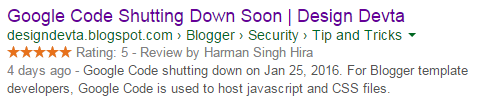
I added these Schema Review codes in my this Blog and hureee! Google start indexing my posts with review. Check the image below or click here


How to add it on Blogger?

Well, good question. We can't add votes on blogger but atleast we can add Stars, Rating and Reviewed by in Blogger. Here are some simple codes. Add them in Blogger Template above or below <data:post.body/> Tag.


<data:post.title/>
<br/> <data:post.author/>
<br/> 5
of 5 <data:post.snippet/>


You can use Google's Structured Data Testing Tool to check my site Review Schema.


Testing Tool


I hope this will helps you too. If you have any suggestions then please share with us. This Trick is found by GeoKasur so anyone using the above codes without giving proper credit-back link to me or my site would have to face some legal issue. Therefore, do respect the work. Thank you for patronizing Design Blaster. I am sure your visit to us must be quite satisfying and in line with your expectations from us. Just in case, it's not as you expected from us or if you are facing any problem, kindly forward your feedback's directly to us by leave a Comment below or using our Contact form. And, get assured response from my side. Your feedback's and suggestions are extremely valuable to us. Please, if you like our this post then share on your social network. Assuring you of our best service always.


I recently Post about 1000s totally Free Domain Names for Blogger and Website. Many users like that post but in this post, i want to mention some Merits and Demerits of Free Domain Names. Every coin has two faces so read this post and give me your reviews. Merits One major merit of a free domain is cost effectiveness which is very essential for any website owner. With the reduction in expenses for creating a website, the owner will be able to save cost and have more funds for other web development tasks. Besides, since majority of free names are for one year, you will have enough time to raise funds for renewal when they expire and you can renew for one, two or three years and above. For a short period site, it is like a gift because there may not be need for renewal. Hence, free names are very useful for special events and festivals because once the events are over, there is no need for renewal.

In addition, web developers don't joke with free domains because they enhance their jobs. Majority of web developers register multiple domains names for one website in order to defeat cybersquatters. Demerits Major demerit of a free domain is limited service. If you get a free TLD attached to a web hosting plan, you can only use it for one year and later renew it. If you get a sub-domain (which is not recommended for serious online business), you will not have access to the Domain Management System (DMS) which is the basic proof of domain ownership. Also a free sub-domain may be flooded with both wanted and unwanted adverts which may not be ideal for your business. It may also not be dependable because the owner of the domain can ban it at anytime and this can lead to loss of rank, visitors, back-links and so on.

Consequently, extra caution must be taken when going for free domain names. It is very important for you to get your free names from a reliable source especially if you are getting a TLD attached to a web hosting package. It is strongly advisable to stay away from free sub-domains unless you want to be online for fun. Sub-domains are not ideal for online businesses, hence, you can pay to register a name (after all it is not expensive) or get a free one attached to a web hosting package. Image Courtesy: Broadband Cloud Solutions
Source: Ravi Stuff Thank you for patronizing Design Dev. I am sure your visit to us must be quite satisfying and in line with your expectations from us. Just in case, it's not as you expected from us or if you are facing any problem, kindly forward your feedbacks directly to us by leave a Comment below or using our Contact form. And, get assured response from my side. Your feedbacks and suggestions are extremely valuable to us. Please, if you like our this post then share on your social network. Assuring you of our best service always.

MKRdezign

Contact Form

Name

Email *

Message *

Powered by Blogger.
Javascript DisablePlease Enable Javascript To See All Widget