Articles by "Facebook"


Facebook keeps a record of everything you search for on its Web site. Check out this How To guide for cleaning up the list, or just limiting what information Facebook is storing about you. Each time you look for a friend, business, or personality on Facebook, it gets saved to your search history. Supposedly, this makes it easier for you to find what you were looking for later without much work. Unfortunately, the search history might be cluttered with queries that don't require quick access - like someone you've already become friends with, a brand you're already following. If you want to limit some of the information Facebook is keeping about you, or just tidy up the list, it's just a few clicks away. Here's how to get started:

How to? #1: Log in to Facebook. #2: Go to your Profile or click here

#3: Click on View Activity Log Button (On the Right Bottom of your Cover with Update Info)


#4: Now click on More look below Photos, Likes & Comments. (From Left Side Menu)


#5: Many options will be appeared. Find Search Option and Click on it.


#6: Now Click on Clear Searches Text (On Top Left Side)


#7: Final Step. I Popup will be Come. Click on Blue Clear Searches Button.


#8: Done

Source: C|net Image Courtesy: Cite Social Thank you for patronizing Design Blaster. I am sure your visit to us must be quite satisfying and in line with your expectations from us. Just in case, it's not as you expected from us or if you are facing any problem, kindly forward your feedback's directly to us by leave a Comment below or using our Contact form. And, get assured response from my side. Your feedback's and suggestions are extremely valuable to us. This Post is written by GeoKasur. There is no any source so Copying or using this post for your own site is not allowed. If anyone do so get ready for facing DMCA. Please, if you like this post then share on your social networking sites. Assuring you of our best service always.


Imagine having the whole wide world tuned in to your every update? Facebook subscribe - is one of the unique ways to get people subscribed to your every update even though they are not your friends on Facebook. When you have a huge subscriber base you can easily garner a large audience when you post about anything on your Facebook wall. Mark Zuckerberg has million people subscribed to him in real time; imagine the enormous traffic that each of his status update will generate?

Do you also want a large following? You also want to grow your subscriber base? Below are some quality tips on how you can successfully increase your Facebook subscriber base: #1: Disable Friend Request You can disable friend request or make them private. So when people want to connect with you, they'll find only the 'Follow' option. #2: Post Informative and Helpful Topics Getting information is the norm of the everyday life we now live in. When you place yourself as a good source of information you'll immediately start to get a quality following because of the need you satisfy. Focus on a niche you're very good and knowledgeable about and consistently post helpful topics to help those who might need it. "Give and take" is what every human being wants and craves for; everybody wants to take something, when you're not adding anything to a person's life you'll eventually be caught off or ignored.

To be significant on Facebook, one needs to add value to people's life on a consistent basis. Updating regularly about the niche you're very knowledgeable will automatically make you a hotspot on that topic, which will prompt people to subscribe to your Facebook updates. #3: Share Update with Public Due to some Facebook privacy concerns you might have stopped sharing update with people who are not your friend on Facebook and you might have also chosen to share your status update with your friends only. But to maximize your chances of getting Facebook subscribers to subscribe to your update, you'll need to share your post with "Public".


Remember, your friends are already automatically subscribed to your update immediately you became friends with them. The outsiders (your friends' friends) are the very ones that you're targeting. If they continually see your update and it is informative and unique they may likely subscribe to your update to get notification of anytime you would update again. But they can't see your quality and informative update if you've restricted your status update to "Friends" only. If you want them to see your update on a regular basis then tick the visibility level of your post form "Friends" to "Everybody". And surely, you'll see your subscriber base increase drastically.

#4: Use Facebook Subscribe Button Widget You can add a subscribe button like this on your blog or blog post. The Facebook Subscribe button will look like this:

This will work effectively if you have a website or blog. This is considered the best way to get subscribers to your Facebook page especially if your website is getting a huge amount of traffic at all times. To get a widget just go to Facebook developer site and create a unique Facebook subscribe button widget for your website or blog. Copy the code and paste it anywhere you like on your site and watch your subscribe count increase. #5: Comment on Famous Celebrity's status update You can connect with various famous celebrities on Facebook and interact with them publicly. This might help you to get recognition and their subscribers and friends might connect with you.


#6: Your Profile Up To Date A Facebook user will 99.9% likely not send a friend request to a person who doesn't have a profile picture or who has an incomplete profile. People need to feel secure before they can love and have friends on Facebook; Trust will have to be seen and earned before they will initiate friendship with anybody.

The more your Facebook profile looks more complete and mature, the more people will trust and may likely subscribe to you. Your Facebook profile is the most important page on your Facebook account; it contains important details about you, starting from details about who you are and what you have to offer to prospective friends who might eventually view your profile. Fill all the important details that is needed on your profile, especially your profile picture. Put a face to the name. You just have to prove that you're not a robot or a spammer who is out to con people of their valuables online. By filling all the needed details on your Facebook you will single-handily start seeing an increment in subscribers. Follow the above tips very well and you'll notice how popular you'll become. Have you tried out the Facebook subscribe? Which strategies have you being using that works and how has it helped your business or brand? Source: Hell Bound Bloggers Thank you for patronizing Design Blaster. I am sure your visit to us must be quite satisfying and in line with your expectations from us. Just in case, it's not as you expected from us or if you are facing any problem, kindly forward your feedback's directly to us by leave a Comment below or using our Contact form. And, get assured response from my side. Your feedback's and suggestions are extremely valuable to us. This Post is written by GeoKasur. There is no any source so Copying or using this post for your own site is not allowed. If anyone do so get ready for facing DMCA. Please, if you like this post then share on your social networking sites. Assuring you of our best service always.


After my yesterday's Post "How to Disable Facebook Autoplay Video"; i'm back with my new post again about Facebook. Facebook is largest Social Media Network having 100 millions Users around the world. Facebook is the best way to stay connected with our Friends and Family members, and for some 'Unknowns' also. Facebook limit for making friends is 5000. Facebook gives all option to filtering friends by Current City, birthdays, Hometown and many more except Lost Friends. Friends those remove you from their friend list. So here a way to find out.

#1: By Installing Extensions

  • Install the Extensions for your Browser. For Chrome & For Firefox.

  • Done. Now it will notify you whenever someone remove you from his/her List.

  • You can also check this by go to you friend list then click on Lost Friends Option.


#2: Some Online Methods

Thank you for patronizing Design Blaster. I am sure your visit to us must be quite satisfying and in line with your expectations from us. Just in case, it's not as you expected from us or if you are facing any problem, kindly forward your feedback's directly to us by leave a Comment below or using our Contact form. And, get assured response from my side. Your feedback's and suggestions are extremely valuable to us. Please, if you like our this post then share on your social network. Assuring you of our best service always.


My recent article about Facebook that "How to Report Suicidal Post to Facebook" helps many readers. In my this Article helps you to disable Auto-Play Videos in Facebook. Maybe, you should that Facebook launches their new feature regarding Videos. When any Video on Facebook Home Page comes then it started playing without your command. Videos started playing without sound. Feature is recommended for good speed internet and unlimited data plan. For others, this feature used lots of KB. So, here are some simple step to disable this feature. Read it carefully:

How to Disable it? #1: Login to Facebook and Go to Settings. #2: Click on the Videos (Last option on Left side Menu) #3: Now Off it for Autoplay Videos.

How to Disable in Smartphones? #1: Click Settings #2: Then go to App Settings (at Last) #3: Now find Autoplay Videos Option and make it Off. Image Courtesy: Mashable  Thank you for patronizing Design Blaster. I am sure your visit to us must be quite satisfying and in line with your expectations from us. Just in case, it's not as you expected from us or if you are facing any problem, kindly forward your feedback's directly to us by leave a Comment below or using our Contact form. And, get assured response from my side. Your feedback's and suggestions are extremely valuable to us. Please, if you like our this post then share on your social network. Assuring you of our best service always.


Facebook can be confusing, especially for those just starting out with it. I hear a lot of people getting confused between profiles, pages and groups. Most of them are of course, new users. People like me who have been using the service since long time, have adopted with the new things that eventually came along. But for new users just starting out, this can be a confusing process. So, it is important to know about differences between Profiles, Pages and Groups. #1: Profile A Profile is the basic privilege you get when you first sign up. After you have completed the basic sign up process, you're redirected to your profile.

Profiles are meant to be personal, for individuals and not for business. If you want a personal account, like most people, you'll have to sign up for an individual profile. Facebook prohibits creating personal profiles in the name of business because profiles are meant to be for individuals only. According to the information provided in the Help page:

Personal profiles are for non-commercial use and represent individual people.

Your Facebook profile will contain your personal and public information including your name, age, gender, interested in, workplace, hometown, school etc. You can add friends, upload pictures, share statuses but you cannot run promotional ad campaigns on behalf of, say, your business. So, you're limited to sharing personal information only. A single profile can be run by one person only.

#2: Facebook Pages

Pages are meant for celebrities and businesses. If you have a business you legally run and operate, you can create a page about it. It will contain information on your business, include promotional offers, official events etc. Facebook is a great way to reach your audience and grow your business. Which is why, more and more businesses are desperate to grow their online presence on the site. The core difference between a Profile and Page is in their purpose. While Pages are meant to serve commercial purpose (like Business or Celebrity), Profiles are meant for non-commercial purposes only. Facebook also has strict policy regarding this. You are not allowed to create a personal profile for your business. But you may open a page on your name, but if you're willing to connect with your friends and family, you should create a profile which allows you to add friends. You cannot add a friend through your Page. Also, you'll need a Profile to maintain a Page. A Page can be administered by more than one person.

Pages look similar to personal profiles, but they offer unique tools for businesses, brands and organizations.


#3: Facebook Groups

Groups serve the purpose of connecting a community of like-minded people. Groups can be created by anyone and based on the type (open, closed, secret), others may be able to join. Profiles and Pages look the same, but Groups have a different layout. A Group can contain thousands of members and be administrated by more than one person. Usually, Groups are created surrounding different topics like Pets, Computers, and Common Interests etc. Anybody can join an Open group but Closed Groups require admin approval. Secret Groups are private and can only be seen by admins and members. Closed groups can be seen by anybody, but only accepted members may join in. Open groups are free for anyone to join. In a Group, you can post statuses, images, videos, notes. You can interact with other group members even if they're not on your friend list, but you cannot see their private information that is only shown to their friends.
Source: Ravi Stuff

Thank you for patronizing Design Dev. I am sure your visit to us must be quite satisfying and in line with your expectations from us. Just in case, it's not as you expected from us or if you are facing any problem, kindly forward your feedbacks directly to us by leave a Comment below or using our Contact form. And, get assured response from my side. Your feedbacks and suggestions are extremely valuable to us. Please, if you like our this post then share on your social network. Assuring you of our best service always.


Facebook is a place to share and connect with friends and family. For many of us, it's also a place to remember and honor those we've lost. When a person passes away, their account can become a memorial of their life, friendships and experiences.

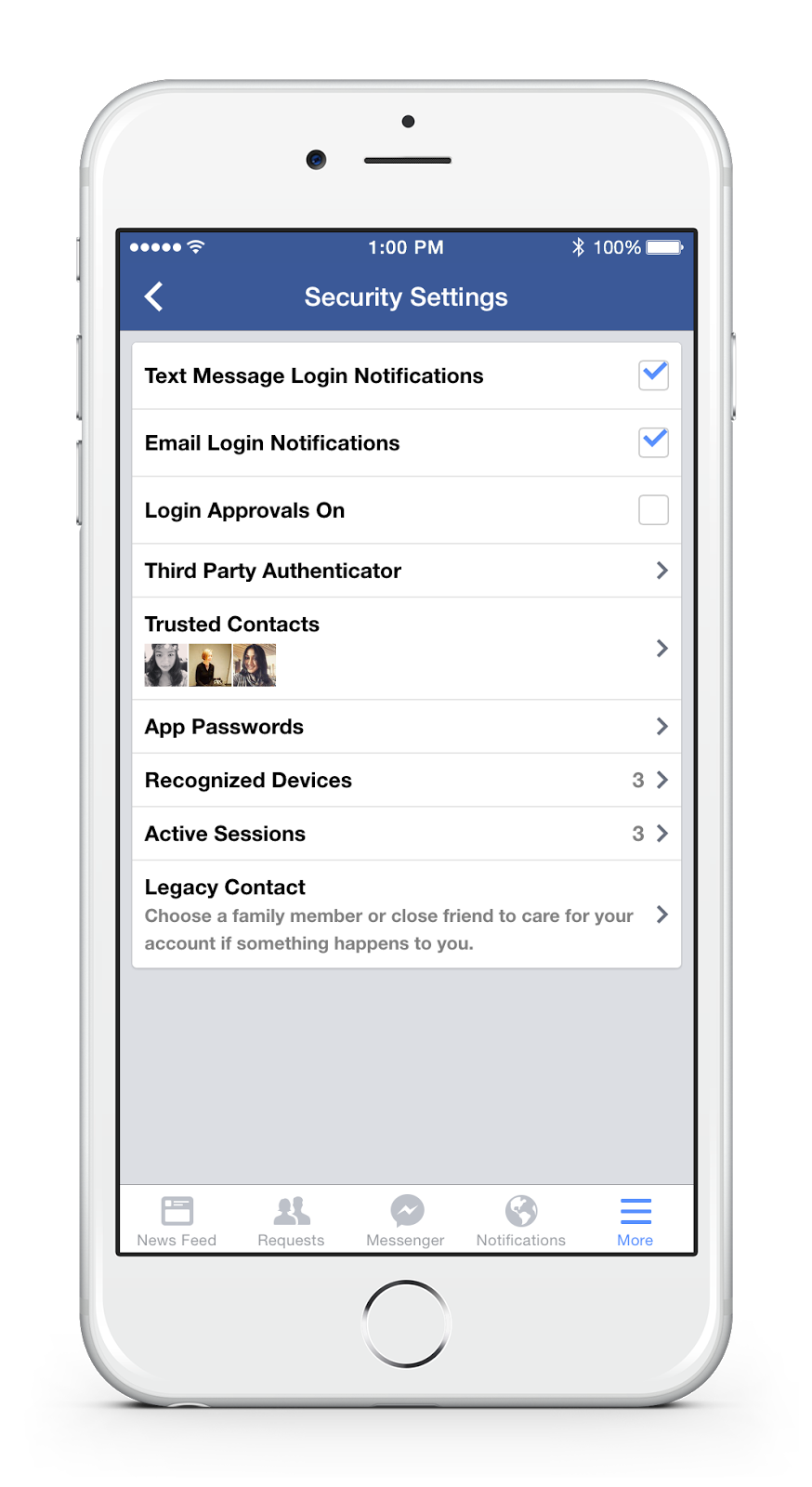
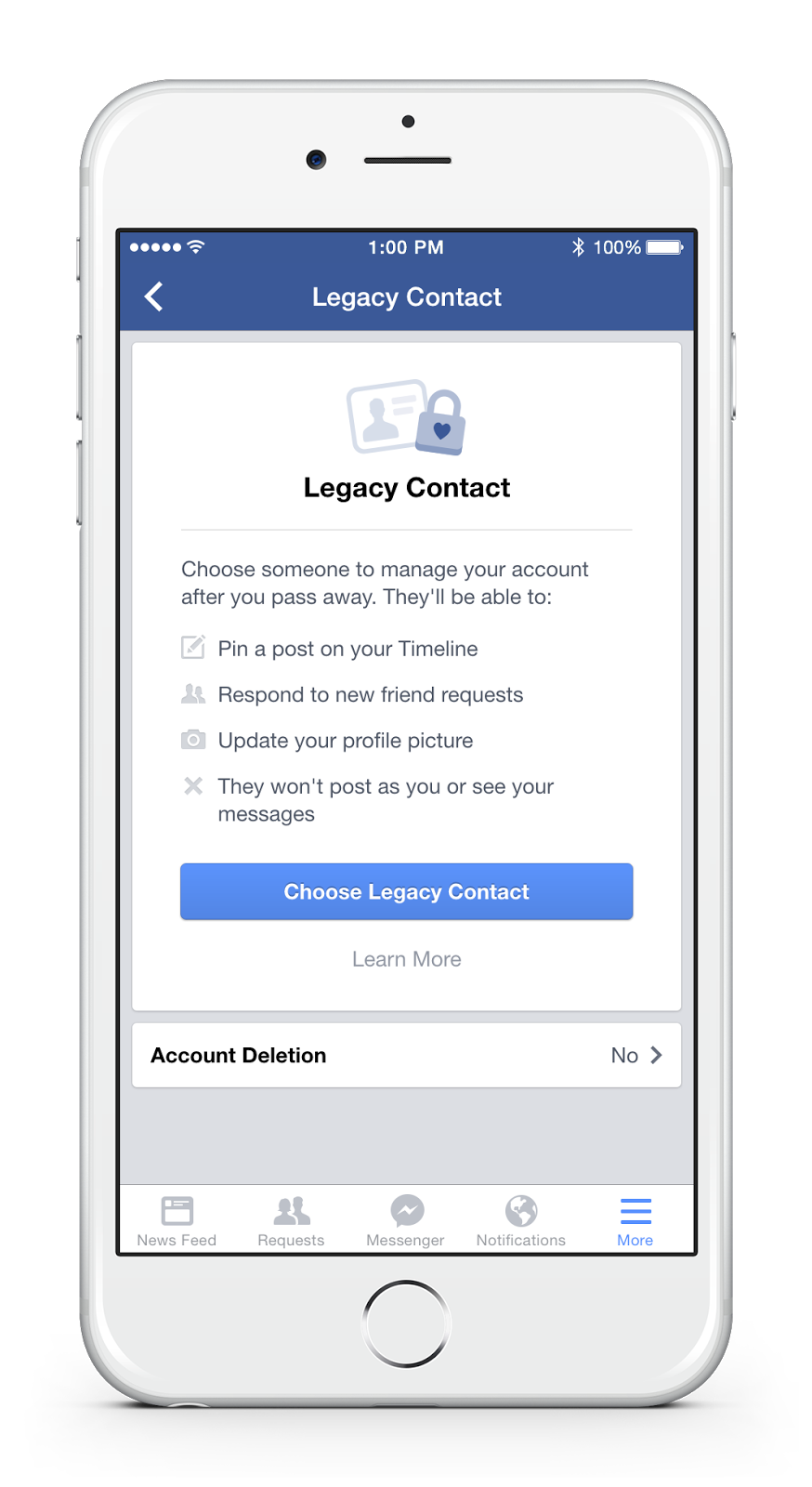
Today we're introducing a new feature that lets people choose a legacy contact-a family member or friend who can manage their account when they pass away. Once someone lets us know that a person has passed away, we will memorialize the account and the legacy contact will be able to:

  • Write a post to display at the top of the memorialized Timeline (for example, to announce a memorial service or share a special message)

  • Respond to new friend requests from family members and friends who were not yet connected on Facebook

  • Update the profile picture and cover photo


If someone chooses, they may give their legacy contact permission to download an archive of the photos, posts and profile information they shared on Facebook. Other settings will remain the same as before the account was memorialized. The legacy contact will not be able to log in as the person who passed away or see that person's private messages.

Alternatively, people can let us know if they'd prefer to have their Facebook account permanently deleted after death.

Until now, when someone passed away, we offered a basic memorialized account which was viewable, but could not be managed by anyone. By talking to people who have experienced loss, we realized there is more we can do to support those who are grieving and those who want a say in what happens to their account after death.


Apply for legacy


Here's how to choose a legacy contact:

Open your settings. Choose Security and then Legacy Contact at the bottom of the page.


After choosing your legacy contact, you'll have the option to send a message to that person.


You may give your legacy contact permission to download an archive of the posts, photos and profile info you've shared on Facebook.


We've also redesigned memorialized profiles to pay tribute to the deceased by adding "Remembering" above their name and making it possible for their legacy contact to pin a post to the top of their Timeline.


We're introducing legacy contacts in the US first and look forward to expanding to more countries. Setting up a legacy contact is completely optional.

Source : Facebook Newsroom

Thank you for patronizing Design Dev. I am sure your visit to us must be quite satisfying and in line with your expectations from us. Just in case, it's not as your expected from us or if you are facing any problem, kindly forward your feedbacks and comments directly to us by leave a Comment below or Contact us. And, get assured response from my side. Your feedbacks and suggestions are extremely valuable to us. Please, if you like this post then share on your social network. Assuring you of our best service always.


Facebook is world's Best Social and most used website after Google in the world. In the whole world there is 500 million People who is on Facebook having Pages or personal Id's. There is so many  renowned people in Facebook so everyone in the world want to be friend of them so Facebook have option for  renowned people to have Facebook page and have so many fans. Facebook recently introduce Facebook page verification with a Tick badge there in-front of Facebook page so people can get to know that particular page is of real people. so know every one in Facebook want to get verify there own pages but Facebook have some restrictions in this option we can only request Facebook to verify our page but its depends on them they verify or not as they said they only verify page of  renowned people in the world. Facebook Verify only four type of pages or profiles which are

  • Journalists

  • Popular Brand or Businesses

  • Government Officials

  • Celebrities


These are the four categories of pages which can be verified by Facebook.Suppose if you have any local business which is popular then Facebook may claimed your page if you are official representative. Then their is no need to submit any type of request to Facebook. They automatically claim your page as verified depend on some details and minimum requirements mention by Facebook.
How to Verify?

If you have pages mentions above ten there will be chances to get your page verify in Facebook. Your page must be official represent your local business or any personality and may be have some popularity on Facebook. when you create faecbook page fill all the real info about your or your business so facebook will get to know that your real person. you need to follow some instructions

  • Link To Your Profile or Page From Official Website and also link website on your page or profile.

  • Provide accurate information in details about your business in About Section of Page or Profile


In About section must add significant long and short description, keyword who represent your business, Email, Website, Products and verified page location with claimed business address and other details in Page Info tab. To send them Facebook page verification request you need to follow the link given below and fill the real information.


Verify Now


Fill in the required information and send request and than you are done. Best Of Luck.


When Facebook was founded, every user was given an ID number. It began with ID #0, which redirects every user to their own profile page. ID numbers 1-3 were tests that Mark Zuckerberg used to initially test Facebook; the profile pages no longer exist. The first real Facebook user starts at ID #4. It belongs to Mark Zuckerberg. Facebook ID numbers were assigned in somewhat sequential order; schools were chunked up in blocks up to 100,000 IDs. Harvard was the first chunk (0-99,999). My number is about 5,500,000. This makes sense because Syracuse was the 56th school on Facebook. It's not clear how IDs were assigned once Facebook expanded beyond college networks. But, if you were an early Facebook member and joined through a university network, your ID number probably closely resembles the order in which you signed up for the site. How i can get my ID? Just Enter your Facebook Username or Profile/Page Full URL in below field and Press Get Fb ID Button. Done. Its so simple.


Tutorial Step 1: Copy your Facebook Username or URL.


Step 2: Then Paste the URL in above textfield and Press "Get Fb ID".


Step 3: Done


Facebook is become number one website on the Web. Even you are also log in to it every single day from many devices, like from your mobile phone, computer, laptop and your office workstation. There is a chance that you may leave your Facebook account without logging out. If your account gets accessed by any strangers then it's going to open up a large can of worms. So you should seriously try to prevent unwanted access to your account. One more Possibility for Account Hack is; if your smartphone or device gets stolen then. It's a whole different matter. There are many ways to prevent access to your Facebook Account. In this article, we will go through some important options you can take to prevent others from accessing your personal Facebook account. So, lets get Started... 1. Strong Password You already have your password created for Facebook however it is advisable for you to make sure your Facebook password is one of a kind and different from your other online accounts e.g. email, blog, hosting etc. To change your password, go to Account Settings > General > Password. The best password is the combination of Small and Capital letters, Numbers and Symbols. 2. Add Phone Number Confirming your mobile number is one of many ways to enhance your account security on Facebook. This way, even when you lose or forget your password, Facebook will be able to send you a new one via SMS. To add your mobile number, go to Account Settings > Mobile and click on Add a Phone. Select your country and set the mobile carrier before clicking Next. Now you will be given an instruction to send an SMS to the given number. Follow the instructions to get a code via SMS, and then enter the code into the column. You also have the option to Share your number with friends on Facebook and Allow friends to text me from Facebook. Select your preferences and click Next. Now your mobile phone is registered with Facebook, and when the need arises, this connection will be useful to reactivate your Facebook account. 3. Activate Trusted Contacts Almost everyone have trusted friends and of course they are your friends on Facebook. Or, you must have family members added on your account. So, why should you don't add them as trusted contacts. To add your trusted contact, go to Account Settings > Security and click on Trusted Contact. Choose Trusted Contents 4. Activate Login Notification When you or anyone login to new or untrusted browser then i will send Email or SMS. To activate click Account Settings > Security and Login Notification


Click the check box of Email and Text Messages. 5. Activate Trusted Browser Check once in a week your Trusted Browser. To add your trusted browser, go to Account Settings > Security and click on Trusted Browsers. 6. Disconnect Previous Active Sessions The good thing about Facebook is that it lets you know about your previous active sessions, where you log in from, and what devices you used to access your Facebook account. Now to make sure your account is safe, from the Account Settings > Security page, look for 'Where You're Logged In' and click on Edit.


Now all previous sessions will be listed, together with the current active session at the top of the list. Click on the link 'End Activity' to kill the activities from other devices. 7. Don't 'Keep Me Logged In' The moment you want to login to your Facebook account, at the Log In page, there's a small check box that says Keep me logged in. Make sure this box is unchecked. Then, log in as usual. With this on, you will be asked for your email and password every time you launch Facebook.


8. Avoid Spam Links Facebook is serious about spam and is always enhancing its features to make sure you are safe from being a victim to scams. The types of attacks include money scams through direct or indirect requests via Facebook messages, chat etc, phishing links that will redirect you to fake websites, malicious links that could retrieve your personal information or even harm your computer. There are also chances you may receive emails from 'Facebook' but it is actually from a phishing website, this is part of a scam. 9. Sign Out After Use Lastly which is the most important for all (and definitely worth repeating), never forget to log out from your Facebook account. 10. Don't Share your Password to Anyone Never share your Password to anyone whether he/she is your Friend or any Family Member.


Social media play an important role to make your business popular especially Facebook Pages. According to a research (unknown), every seventh person of this planet is on Facebook. Facebook has 890 million daily active users on average for December 2014 (Wikipedia). A "Like" on your Facebook Page is not just a vanity metric. It signifies a real person showing interest in your business. In short, It is very Popular Network. Even many SEO tools added a new feature in their siteto check Site's Social Status.

So your Facebook Page Likes really matters. Here i mention some tips or steps, whatever you would like to call; to increase likes. I mention fair and unfair both ways so its up to you to use but i recommend only fair ways. Let's get started: #1 Invite your Facebook Friends Inviting your Facebook friends to liking your page is the recommended and fair way to increase likes and it is easy way too. To invite friends, first go to your page (not as admin) then click on three dots Button (on the right side of message button). At last, click on Invite Friends option. Start inviting your friends. Ask your friends too, to use this step for you. #2 Use Facebook Widgets If you have a Site then you can add Facebook Like Box or Facebook Like Button to your Site. This increase your Facebook likes and user can also easily find out your page for your business. To set up the Like button for a site, you just need to click here. Choose any widget i.e. Facebook Like Box. Enter you Page URL, set width-height, etc according to you then click Get Code. Copy code the add them in your Site wherever you want to display widget. #3 Post Valuable Content The best way to increase your following on Facebook is by treating your fans like people -- and that means consistently delivering content that is valuable to them. Delivering value really comes into play with the content you create and share with your fans, and how you interact with them.

It's all about building long-term relationships with your Facebook fans. They might not remember one individual post to Facebook, but if they notice you consistently publish high quality, helpful, and relevant posts to Facebook, they'll think of you as a valuable resource. Source: HubSpot Blog #4 Using Page Tabs This is another useful way to increase likes. User can easily access your site through it or you can add contest tabs. Give users reasons to like your page. Use following below sites for adding Page Tabs:


#5 Using Unfair Method (Not Recommended) Many users thinks that "What is this, Unfair Method?". Well we do not recommend anybody to use it. This is fully against Facebook Policies. We add it because it is also a part of this article.  There are many site where you can increase your Facebook Page Likes and these are not fraud site. They actually helps you to gain likes. Not only Facebook Likes, even also works in Twitter Followers, YouTube, etc. Add you need to do is just Register an account on following below sites. then hit Add a Site Button. Select your Facebook Page and Enter your Page link. Just Save it. Earn Points by liking other people pages. As many pages you like, likes on your page will grown up.

Image Courtesy: SEO Clerk Thank you for patronizing Design Blaster. I am sure your visit to us must be quite satisfying and in line with your expectations from us. Just in case, it's not as you expected from us or if you are facing any problem, kindly forward your feedbacks directly to us by leave a Comment below or using our Contact form. And, get assured response from my side. Your feedbacks and suggestions are extremely valuable to us. Please, if you like our this post then share on your social network. Assuring you of our best service always.

Facebook (formerly [thefacebook]) is an online social networking service headquartered in Menlo Park, California. Its website was launched on February 4, 2004, by Mark Zuckerberg with his college roommates and fellow Harvard University students Eduardo Saverin, Andrew McCollum, Dustin Moskovitz and Chris Hughes. The founders had initially limited the website's membership to Harvard students, but later expanded it to colleges in the Boston area, the Ivy League, and Stanford University. It gradually added support for students at various other universities and later to high-school students. Facebook now allows anyone who claims to be at least 13 years old to become a registered user of the website. Its name comes from a colloquialism for the directory given to it by American universities students.


After registering to use the site, users can create a user profile, add other users as "friends", exchange messages, post status updates and photos, share videos and receive notifications when others update their profiles. Additionally, users may join common-interest user groups, organized by workplace, school or college, or other characteristics, and categorize their friends into lists such as "People From Work" or "Close Friends". Facebook had over 1.3 billion active users as of June 2014. Due to the large volume of data collected about users, the service's privacy policies have faced scrutiny, among other criticisms. Facebook, Inc. held its initial public offering in February 2012 and began selling stock to the public three months later, reaching an original peak market capitalization of $104 billion. As of February 2015 Facebook reached a market capitalization of $212 Billion. How to get Locked Profile Picture? This Trick is first discovered by me (GeoKasur) on my previous Blog (Open w3). But as you know, now many other blogs posted this trick on their Blogs/Sites without mentioning us. Never mind... Here its is again. Just enter a Victims Username or Numeric ID in below field then click on Get it. Simple.
Tutorial Step 1: Get Facebook Username or ID.


Step 2: Enter in above Field.


Step 3: Done.

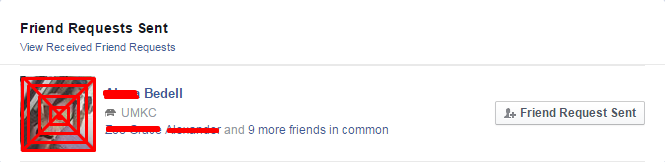
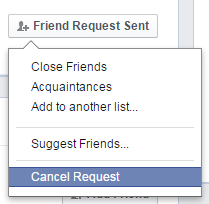
Facebook is the number one social network site, where we connect with our friends and family members. But we often send friend requests to peoples who are not known to us. Those peoples are from our city or we just want to contact with them for a different reason. It is OK to send friend requests to unknown peoples, but do you know that when you do this your Facebook activity is being tracked by Facebook algorithms. When those friend requests doesn't approve by the person then your requests go in pending state. Then you forget about the request after some time and you keep sending requests to other peoples and you got your Facebook account blocked. The main point is not with sending friend requests the main thing is pending requests that you send to unknown peoples who don't accept your friend request. After some time and a limit of Pending Friend Requests your account got blocked.  Now you want to send more friend request to some known peoples or to your new friends but you can't do this when your account is blocked. For this you have to cancel those pending friend requests or send messages to those peoples to accept your friend request. You can send messages from your friends ID or over when the block limit is over.  Now the main point comes, how we come to know that our friend requests are pending? And how we come to know those peoples who are not accepting those friend requests. For this you have to follow below are defined tutorial which will tell you how you can check Facebook Pending Friend Requests. Step 1: Log in your Facebook Step 2: Now click here or here Step 3: In new Tab, your Sent Requests will Opened. Step 4: If you want to Cancel Sent Request then, just move your mouse Arrow to "Friend Request Sent" Button.


Step 5: A Menu will popup under that button. Step 6: Select "Cancel Friend Request" Option from it.


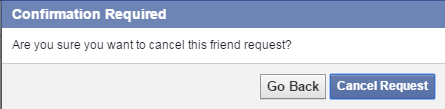
Step 7: Again Click on "Cancel Request" Button on Confirmation.


Step 8: Done Image Courtesy: Mashable Thank you for patronizing Design Dev. I am sure your visit to us must be quite satisfying and in line with your expectations from us. Just in case, it's not as you expected from us or if you are facing any problem, kindly forward your feedbacks directly to us by leave a Comment below or using our Contact form. And, get assured response from my side. Your feedbacks and suggestions are extremely valuable to us. Please, if you like our this post then share on your social network. Assuring you of our best service always.


Social media and suicide have an important relationship. In one widely known case, the death of Phoebe Prince, it is generally believed that her actions were motivated by cyberbullying. In 2008 police in the United Kingdom expressed concern that "Internet cults" and the desire for achieving prestige via online memorials may encourage suicides. Vincent Nichols, the Archbishop of Westminster, has warned that popular social networking sites lead young people to form "transient relationships" which put them at risk of suicide when they collapse. One of the rising research questions being asked by psychologists is where kids are getting the idea of suicidal tendencies. One of the explanations that have risen is the cause and effect relationship between social media advertised suicides and younger generations being influenced by them. One of the reasons behind kids being influenced by suicide tendencies via the internet is the psychological explanation behind "fifteen minutes of fame." Media tends to blow up videos and Facebook status' in order to inform the public of the rising trouble. However the media has yet to taken into consideration the band wagon appeal it brings to the young and immature minds of teenagers. Learning that an action like this can give a teenager, "fifteen minutes of fame" influences other teens who might feel under appreciated to do the same thing in order to gain attention. There was a research study conducted by the School of Public Health at the University of Sydney, Australia. This study was conducted in order to research whether there is a correlation between suicidal ideation and social media exposure to suicide stories among young adults (14-24). The study concluded that one of the most mentioned sources of suicide stories were social websites. This in mind, there was also a reported rise in feelings of hopelessness and suicidal tendencies among the participants surveyed. (Dunlop, More, and Romer 2009) [Wikipedia]

Recently Facebook started a tool to prevent Suicides if victim posted any suicidal status on Facebook. If your any friend or family member any such thing like this then you can save his/her life by taking a simple steps; just reporting his/her status to Facebook Team. You also check this page on Facebook about Suicide Prevention. There are two ways to report Facebook regarding this matter. First way is effective (according to me), recommend and easy also. But, i mention all two steps. Its up to you, which one you used (if in this situation) #1 Facebook's Suicidal Content Report Page

  • Click here

  • Fill the form correctly

  • Just click Send button

  • Done


#2 Report on Post directly Step 1: Click on the Down Arrow of the Post Step 2: Click choose a option I don't like this post.


Step 3: Then a popup will appear. Select a option I think it shouldn't be on Facebook Step 4: Click Continue


Step 5: Now choose an option It's threatening, violent or suicidal then of course Continue


Step 6: At last, select Suicidal Content or you can choose Self-harm option too. Step 7: Click on Continue button.


Step 8: After this all, Facebook show you various option i.e. Offer help or support, Reach out to friend, Ask us to look at this post, Chat with the trained helper, Call lifeline, etc. It is depend on your country and region where you are living. I hope this post will guide you well. God never made the situation like this but if you are in this situation, your stills can save someone's life. Image Courtesy: United Academics Thank you for patronizing Design Blaster. I am sure your visit to us must be quite satisfying and in line with your expectations from us. Just in case, it's not as you expected from us or if you are facing any problem, kindly forward your feedback's directly to us by leave a Comment below or using our Contact form. And, get assured response from my side. Your feedback's and suggestions are extremely valuable to us. Please, if you like our this post then share on your social network. Assuring you of our best service always.


Candy Crush is a match-three puzzle video game released by the developer King on April 12, 2012 for Facebook, and on November 14, 2012 as a mobile app for smartphones. As of March 2013, Candy Crush surpassed FarmVille 2 as the most popular game on Facebook, with 46 million average monthly users. It is a variation on their browser game Candy Crush. You must have a friend that rapidly send you Candy Crush Game requests. For some, this is a headache so recently i wrote an article to block Facebook App requests with three different methods. And, for some people, this is a way to time pass. But every Candy Crush player don't like zero life. Players want to play without any restrictions.

If you ever search on Google then you will find hundred ways to increase game lives or ways to get unlimited lives. Most of them are fraud ways. They said you to complete some surveys, etc. These surveys helps them to earn money but when you complete the survey, nothing happens. Other ways are difficult and also unfair. All other methods for unlimited lives are illegal and including hacking too. Hacking is serious crime and it is also against Facebook Policies. So What to do? How to get Full Lives? Today my good friend DilPreet Singh came to my house to stay for a night with my family. We just start talking about this game. Then he taught me a way to get full lives in Candy Crush. He is not any blogger or hacker, etc. He only discover a way to solve this game's restriction. So, i decided to share this everyone. The method is simple and some of users will surprised to learn this. Method applies to all Candy Crush Games. We do not require any booted Phone or any other manipulating app. I am using Samsung Core GT-I8262 Smartphone. When your lives came to zero then use following below steps to get full lives.


  • Exit from the Game completely (From recent apps too)

  • Then go to settings and Click on Date and Time option

  • Change the Date to next day. Exit from Setting

  • Launch the game again.

  • Done. Your lives are full.


If you aren't Samsung User then the process is remain same for all Smartphones. Just change the Date to next day and hurree!! Lives Full. Thanks to my BFF DilPreet Singh Some Screenshots


Thank you for patronizing Style Dev. I am sure your visit to us must be quite satisfying and in line with your expectations from us. Just in case, it's not as you expected from us or if you are facing any problem, kindly forward your feedbacks directly to us by leave a Comment below or using our Contact form. And, get assured response from my side. Your feedbacks and suggestions are extremely valuable to us. Please, if you like our this post then share on your social network. Assuring you of our best service always.

MKRdezign

Contact Form

Name

Email *

Message *

Powered by Blogger.
Javascript DisablePlease Enable Javascript To See All Widget